One-on-One Meeting Template: Agenda and Questions for Managers
Table of contents:
- What a One-on-One Meeting Is
- One-on-One Meeting Template
- One-on-One Meeting Questions
- How to Run One on One Meetings
- A Short Scheduling Email
- Frequently Asked Questions
A one on one meeting template is a reusable agenda a manager and a direct report can use for a regular check-in. It is also called a 1 on 1 meeting template or a 1:1 agenda. The point is not to fill a form. The point is to give the conversation a structure so it covers progress, feedback, career development, and next steps, instead of turning into a list of status updates.
This article gives you a free one on one meeting template you can copy, a set of one-on-one meeting questions, and practical notes on how often to meet and how to run the meeting. You can use the same structure for one on one meetings with current staff and for early one on ones with someone new to the company. Later one on ones can shift the focus toward growth, while early one on ones usually spend more time on context. Encourage the person to prepare notes and to bring feedback, not only a status list. It is a management tool, not HR or employment-law advice. It complements a team's broader meeting cadence for leadership teams. A one-on-one is the manager and one person. A leadership cadence is the rhythm for the group. Both meetings matter; they just have a different focus.

What a One-on-One Meeting Is
A one-on-one meeting is a recurring meeting between a manager and one team member. It is not a staff meeting, a project standup, or a performance review, even though progress and performance will come up. The meeting belongs to both people. Many managers treat it as the employee's meeting: the direct report should be able to add topics, raise concerns, and leave with clear next steps.
The phrase is usually written "one-on-one meeting," "one on one meeting," or "1:1." "1/2/1" is not a standard abbreviation. If you need a short label on a calendar, "1:1" or "1-on-1" is enough. This article uses one on one meetings and one on ones the same way. A one on one meeting template, a 1 on 1 meeting template, and a shared agenda are different names for the same tool.
One on ones help managers listen, set expectations, discuss progress, and improve communication with the people they lead. Good one on ones stay a conversation. They also give team members a standing time to talk about workload, career goals, and support they need. Used well, they build trust and can support deeper connections than a group meeting allows. Used poorly, they become a weekly status report the person could have sent in writing.
The meeting also shapes the employee experience. A person who has a predictable place to talk about workload, priorities, and growth usually has more context for company goals and a clearer sense of how their work fits the company plan. That does not replace other engagement work. It does give the manager a regular window into what the employee is actually carrying, and it helps other team members only indirectly: the direct work of the one-on-one is still this employee and this manager.
One-on-One Meeting Template
Copy the sections below into a shared document, a note, or your meeting tool. Keep a shared agenda so both people can add topics before the meeting. This is a free template, not a required format. Save a second free template if you want a free one you can reuse with each person you manage. Managers who run several one on ones can keep one copy of the one on one meeting template for each employee.
Meeting: One-on-one, [Manager] and [Direct report]
Date and time:
Frequency: Weekly or every other week
Last meeting's action items:
Topics the employee wants to discuss:
Topics the manager wants to discuss:
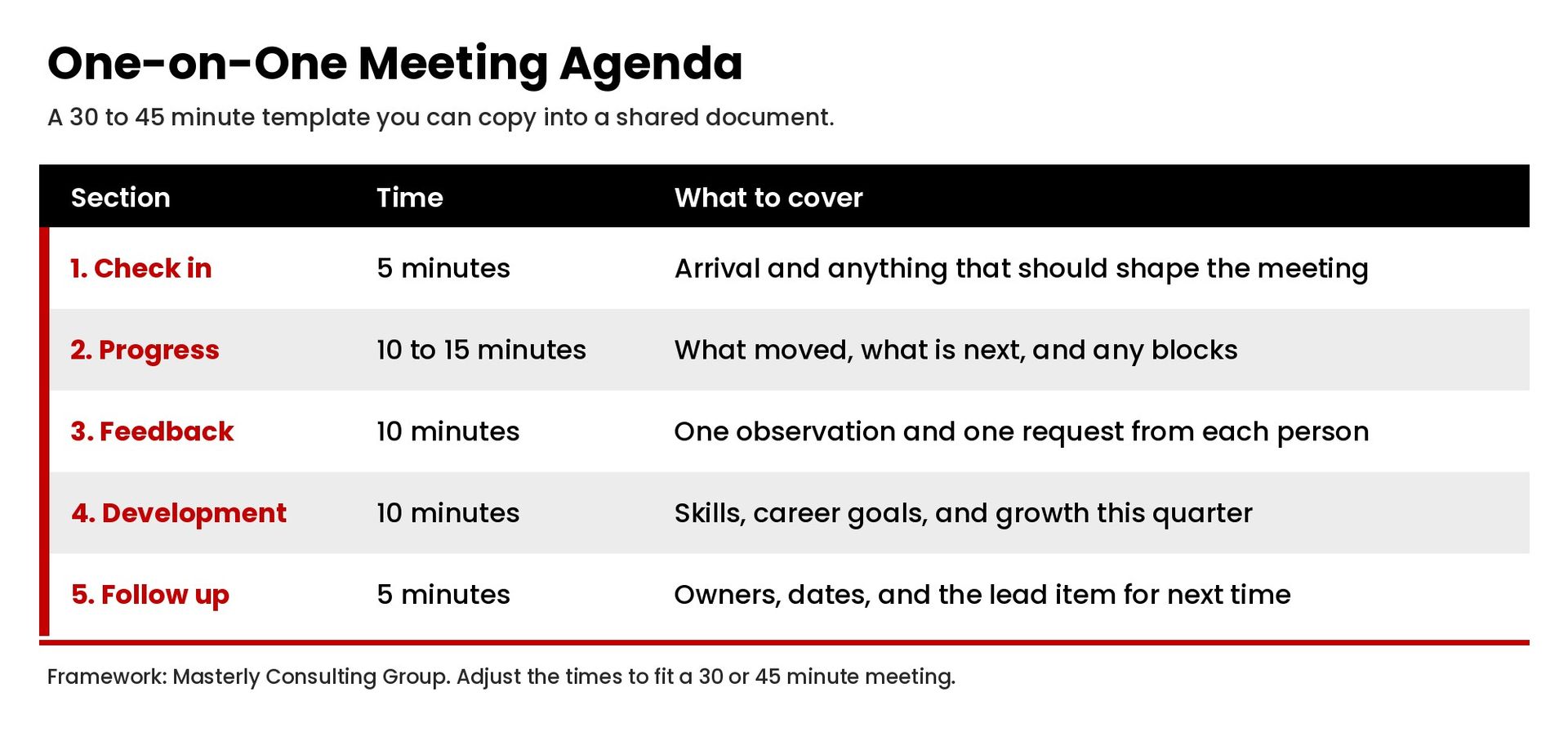
1. Check in (about 5 minutes)
- How are you arriving today, and is there anything I should know before we get into the check in?
- What is taking most of your attention this week?
- For remote employees: is anything about tools, hours, or remote work getting in the way?
2. Progress, priorities, and roadblocks (about 10 to 15 minutes)
- What moved forward since our last one-on-one?
- What are your top priorities until we meet again?
- Where are you blocked, and what support would help?
- What should we stop, start, or continue?
3. Feedback both ways (about 10 minutes)
- What feedback do you have for me as your manager?
- Here is one thing I noticed that is working, and one thing I would like us to adjust.
- Is there a recent piece of work we should walk through together?
4. Career development and growth (about 10 minutes, or longer in alternate weeks)
- What skill or leadership skills do you want to build, and what other skills should we plan around?
- How does the current work support your career goals?
- What would useful talent development look like for you in the next quarter?
- For a new employee or new team members: what would help you get up to speed faster?
5. Action items and follow up (about 5 minutes)
- What are the action items, who owns each one, and when is it due?
- What will we follow up on when we meet again?
- What should go on the agenda now so we do not lose it before we meet again?
Keep the notes in the same shared document. Taking notes in the open helps both people leave with the same action plan. If something sensitive comes up, agree what will stay in the room and what, if anything, needs a later follow-up.
How to Format the Notes
Keep one document per manager and direct report, with the newest meeting at the top or the bottom, as long as you stay consistent. Date each session. Copy last meeting's action items into the new agenda so follow up is visible. Write in short bullets, not a transcript. Record decisions, owners, and dates. After something has been discussed, a short line in the notes is enough; the goal is a usable record, not a polished report. If a concern was discussed and then dropped, add a reminder so it is discussed again. If you use a company tool, give both people access and leave the document open during the meeting so neither person is surprised by the notes later.
You do not need special software. A shared doc is enough. What matters is that the template is easy to reopen before the following session and that action items do not live only in one person's private notes. Create the document once, then reuse the same template so both people can prepare and the notes stay in one place.
One-on-One Meeting Questions
You do not need all of these in one sitting. Pick a few that fit the week. A good question is specific enough to answer and open enough that the person can steer.
To open a check in
- What is going well, and what is heavier than usual?
- What would make this a useful meeting for you today?
To discuss progress
- What are you proud of since we last met?
- What is at risk, and what would change the trajectory?
- If you had two more hours this week, where would you put them?
To give and ask for feedback
- Where do you want more direction from me, and where do you want more room?
- What is one thing I should start, stop, or continue?
- Was there a moment this week when you needed something from me and did not get it?
To talk about growth and development
- What kind of work do you want more of over the next quarter?
- Which skills would you like to practice on a live project?
- What would you like to be known for on this team a year from now?
To close
- What are the next steps, in one sentence each?
- Is there anything we did not get to that should lead the next agenda?
- How can I support you between now and our next 1:1?
These are starting questions, not a script. If a person brings a hard topic, stay with it rather than forcing the rest of the list.
How to Run One on One Meetings
The value of one on one meetings is consistency. One on ones that happen as scheduled give the manager and the employee a place to focus, compare notes, and talk about skills. One on ones that are often canceled do the opposite. The one on one meeting template below is the same tool described earlier; use it as a free template you actually open before each session.
Protect a standing slot on the calendar. Weekly meetings work well when the work moves fast or the person is new. Every other week is a common pattern for experienced team members. Monthly is usually too thin unless you also have other structured check-ins. Remote employees often need the recurring meeting even more, because casual hallway context is missing.
Send or open the shared agenda a day ahead so both people can prepare and add topics. Start on time, and let the employee's topics go first when you can. Listen more than you talk. Status updates that do not need a discussion can move to a written note so the live meeting has room for feedback, concerns, and growth.
Write down action items before you leave, including yours. A manager who promises support and then forgets it will not build trust. The same is true if an employee leaves with work that was discussed and never captured in the notes. Close by confirming the next meeting and any follow up.
One-on-ones should not replace performance reviews, and they should not become a surprise evaluation. If formal performance reviews are coming, say so, and keep a separate process for that. This meeting template is for the ongoing working relationship between the manager and the employee.
Psychological safety, in practical terms, means a person can raise concerns, admit a miss, or question a plan without being punished for the honesty. You cannot declare that climate into existence. You create it by how you respond when the hard topic arrives.
Clear goals help, whether you write them as SMART goals or in another simple format. The template only needs enough structure that progress can be discussed without turning the meeting into a scorecard.
First Meetings, Missed Weeks, and Hard Topics
The first one-on-one with a new employee, or with new team members joining an existing group, should be longer on context and shorter on critique. Ask how they prefer to receive feedback, what they want you to know about how they work, and what a useful meeting looks like for them. Encourage them to add topics before you meet, and to say when a discussion needs more time. Walk through the template once so the structure is familiar before you start using it every week or every two weeks.
If a week slips, do not skip the follow up. Reschedule within a few days, or at least close open action items in writing and keep the following session. Repeated cancellations tell the person the meeting is optional for you and mandatory for them.
Hard topics belong in the one-on-one when they affect the work or the relationship: a missed commitment, a workload that is not sustainable, a conflict with another team, or a career goal that the current role cannot support. Name the issue plainly, listen, and leave with an action plan. Do not use the meeting to spring a formal performance action without a separate, clearly labeled process. This article does not advise on employment decisions or HR policy.
This kind of one-on-one also sits inside a broader operating rhythm. If the team already uses a management operating system for leadership teams, the 1:1 is where individual priorities and personal development get attention that a group meeting cannot hold. Over time, better one on ones can support employee engagement strategies that improve retention, accountability, and performance, because people have a place to talk about the work and their growth. That is a management practice, not a promise of any particular engagement score.
A Short Scheduling Email
You can adapt this email when you set up the recurring meeting:
Subject: Recurring one-on-one
Hi [Name], I would like to set a regular one-on-one so we have a standing time to cover progress, priorities, feedback, and any support you need. I am proposing [day] at [time], weekly / every other week, for [30/45] minutes. I will keep a shared agenda we can both add topics to before we meet. If that time does not work, send two or three options that do. Looking forward to it, [Manager].
Frequently Asked Questions
How do you run a one-on-one meeting?
Open with a brief check in, let the direct report's topics go first, discuss progress and roadblocks, exchange feedback, leave time for growth and skills, and end with action items and a follow up date. Use a shared agenda and keep notes both people can access.
How do you build a meeting agenda?
Start with open action items, then leave space for topics from both people, then use standing sections (check in, progress, feedback, development, next steps) so important subjects do not fall off when the schedule is busy.
How often should 1 on 1 meetings be done?
Weekly or every other week is the usual range. Choose a cadence you can keep. Canceling often is worse than starting with a slightly lighter schedule you will honor.
Is it correct to say one-on-one meeting? How do you abbreviate it?
Yes. "One-on-one meeting," "one on one," and "1:1" are all in common use. "1-on-1" is also fine. "1/2/1" is not a standard form.
What are the top questions to ask?
There is no official top-ten list. The questions earlier in this article cover a check in, progress, feedback, development, and close. Pick a few that fit the person and the week.
What is the 40/20/40 rule, or the 5 P's of a meeting?
Those are labels some training programs use. They are not required rules, and this article does not treat them as a standard you must follow. If a simple split helps you, spend the first part of the meeting on the employee's topics, a shorter middle on yours, and the close on action items.
Key Takeaways
- A one-on-one is a recurring meeting between a manager and one team member, not a status meeting or a performance review.
- Use a shared agenda with standing sections for a check in, progress, feedback, growth, and action items.
- Meet weekly or every other week, keep notes both people can access, and follow up on commitments.
- Let the employee add topics, listen more than you talk, and protect the standing time on the calendar.
- Keep the one on one meeting template in a shared doc so one on ones stay consistent.
The template will not create growth by itself. Growth comes when the manager and the employee use the notes, act on feedback, and return to development often enough that skills have a real plan behind them. Team members notice the difference when one on ones happen consistently and when what was discussed is taken seriously. Prepare for the conversation, keep the company context visible, and let the discussion stay specific.
Put the Template to Work
A one-on-one meeting template is only useful if the meeting actually happens, and if both people treat the discussion as a working conversation rather than a form to complete. Create time for it, keep the notes, and adjust the template as the employee and the manager learn what helps. An employee should be able to see the same notes the manager sees. If the company uses a shared drive, put the template there so the team can find it. Managers who want better one on one meetings should treat feedback as a two-way habit, not a yearly event. The employee, and any other employee you meet with, should know how to add a topic. One more employee-owned item on the agenda is usually better than a manager-only list. Good one on ones keep a regular time and still leave room for the unexpected. When one on one meetings include honest feedback, the employee and the rest of the team get a clearer picture of what good work looks like. Add two more one on ones or one on one meetings only if you can keep them. Pick a standing time, copy the agenda into a shared place, and run the next one with the sections above. If something is urgent next week, put it at the top of the agenda. If you want help tightening one on ones inside a broader leadership cadence or management system, contact Masterly Consulting Group or call (888) 209-4055 to talk through where to start.