Capacity Planning: Strategies, Process, and Tools for Growing Teams
Capacity planning is the process of determining how much capacity a business needs to meet future demand, comparing it with current capacity, and deciding how to close the gap. It covers people, equipment, space, and systems. Good capacity planning helps leaders meet customer demand without overloading the team or paying for excess capacity they do not use.
Capacity planning plays a central role in growth. When demand rises faster than capacity, quality slips, deadlines move, and good people burn out. When capacity grows faster than demand, costs climb and margins shrink. This guide explains what capacity planning is, why capacity planning is important, the types of capacity planning, the three main capacity planning strategies, and a practical capacity planning process any growing company can use.

What Is Capacity Planning?
Capacity planning is the process of determining the production capacity needed by an organization to meet changing demand for its products or services ( Wikipedia, Capacity planning). In simple terms, it answers three questions: how much capacity do we have, how much capacity will we need, and what should we do about the difference?
Capacity can mean several things depending on the business:
- Workforce capacity. The hours, skills, and team availability needed to deliver the work.
- Production capacity. The output a facility, line, or piece of equipment can produce in a given period.
- Tool capacity. The software, licenses, and systems the team relies on.
- Space and infrastructure. Offices, studios, warehouses, and technology infrastructure.
It helps to separate design capacity from actual capacity. Design capacity is the maximum work an organization can complete in a period. Effective, or actual capacity, is what it can complete once real constraints such as quality problems, delays, and handoffs are included. Capacity planning should always work from actual capacity, not the theoretical maximum.
Capacity planning is closely related to capacity management and resource planning. Capacity planning looks ahead and decides how much capacity is needed. Capacity management and resource allocation handle how existing capacity is used day to day. Both are part of operations management.
Why Is Capacity Planning Important?
Capacity planning is important because a mismatch between capacity and customer demand creates waste either way: under-used resources on one side and unfilled demand on the other. The goal of capacity planning is to minimize that gap. The benefits of capacity planning include:
- Meeting customer demand reliably. The business can say yes to work and deliver on time.
- Protecting quality and the team. Capacity planning helps leaders see overload before it causes burnout, errors, or turnover.
- Controlling costs. Avoiding excess capacity keeps payroll, equipment, and space costs in line with revenue.
- Better hiring decisions. Workforce capacity planning shows when to hire, what roles to hire, and when contractors or overtime are a better answer.
- Smarter investment. Strategic capacity planning ties large purchases, such as new equipment or a second location, to forecasted demand rather than optimism.
- Fewer surprises. Leaders can see capacity constraints months ahead instead of discovering them in a crisis.
For a services firm, successful capacity planning may be the difference between growing profitably and growing into chaos.
What Are the Types of Capacity Planning?
There are several types of capacity planning, and most businesses use more than one:
Workforce capacity planning
Workforce capacity planning compares the team's capacity, in hours and skills, with the work forecast for the coming months. It is the most important type for service businesses, agencies, firms, and studios, where people are the main constraint. Our guide to workforce planning covers the longer-term talent side.
Production capacity planning
Production capacity planning looks at how much output a facility or process can produce and whether it can meet production demands. It is central in manufacturing, food production, and any business with physical throughput.
Tool capacity planning
Tool capacity planning covers equipment, software, and technology. A business may have the people to grow but not the systems, licenses, or infrastructure to support them.
Project management capacity planning
In project management, capacity planning checks whether the team has the available capacity to take on new projects without delaying current ones. It connects resource availability to the project pipeline.
What Are the Main Capacity Planning Strategies?
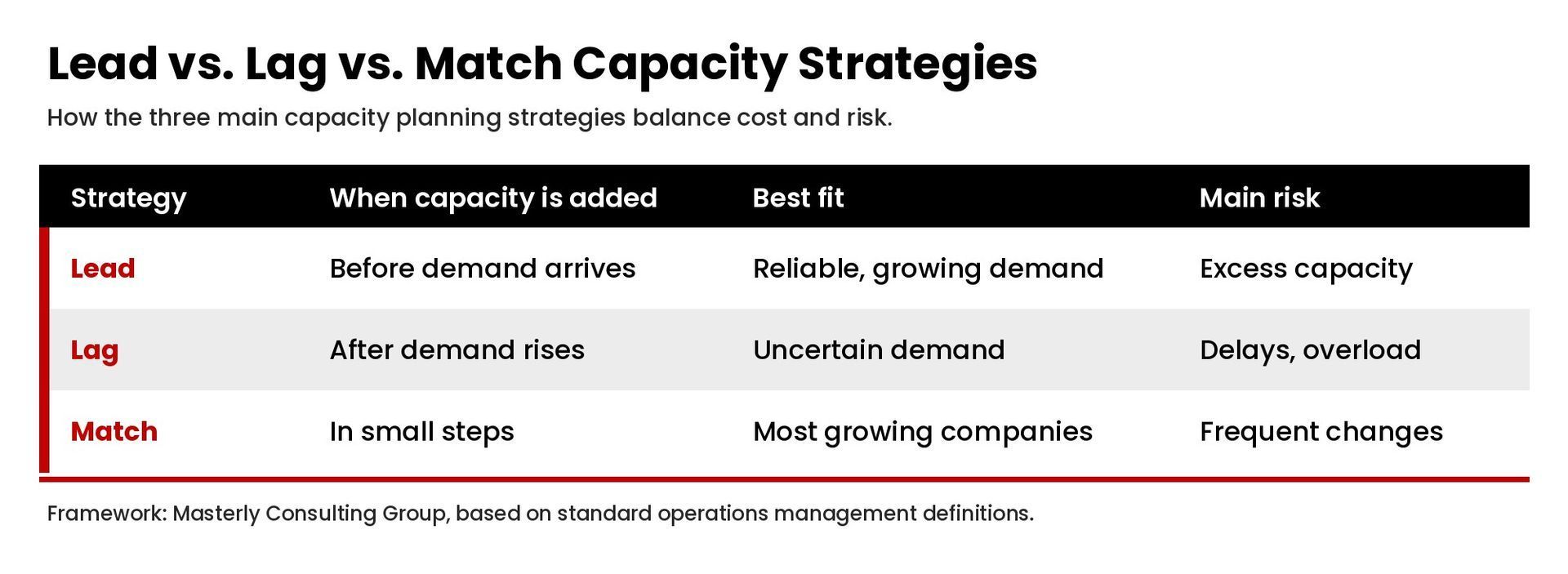
There are three main capacity planning strategies, often called lead, lag, and match. Each one balances risk and cost differently.
Lead strategy
A lead strategy adds capacity before demand arrives. The business hires, buys equipment, or expands in anticipation of growth. A lead capacity planning approach makes sense when demand is reliable, when competitors could capture customers, or when it takes a long time to add capacity. The risk is excess capacity if the anticipated demand does not materialize.
Lag strategy
A lag strategy adds capacity only after actual demand has increased. Lag strategy planning keeps costs low and avoids idle resources, but it risks delays, overloaded teams, and lost customers while new capacity comes online. It suits businesses with uncertain demand or tight cash flow.
Match strategy
A match strategy adds capacity in smaller steps that track demand closely, sometimes slightly ahead and sometimes slightly behind. Match strategy planning balances the two extremes and is often the most practical approach for growing companies. Many firms use contractors, overtime, or part-time staff to align capacity with demand between larger moves.
Choosing among the three capacity planning strategies depends on how predictable demand is, how long it takes to add capacity, and how costly it is to fall short.
How Does the Capacity Planning Process Work?
The capacity planning process follows the same basic steps in most businesses. Capacity planning takes some effort the first time, but it becomes faster with each cycle.
1. Measure current capacity
Start with how much capacity you have today. For workforce capacity, that means available hours per person after meetings, administration, and time off, along with the skills each person brings. For production capacity, measure realistic output, not the equipment maximum.
2. Forecast future demand
Build demand forecasts using historical data, the sales pipeline, signed contracts, seasonality, and market trends. A simple monthly forecast for the next three to twelve months is enough for most small and mid-sized businesses. Note which demand is confirmed and which is forecasted demand.
3. Identify the gap
Compare current capacity with the capacity needed. Where demand exceeds available capacity, you have a shortfall. Where capacity exceeds demand, you have excess capacity. Look at capacity by role or skill, not just in total. A firm can have plenty of total hours and still be short on senior reviewers.
4. Choose a strategy
Decide whether to lead, lag, or match demand for each gap. Options include hiring, cross-training, contractors, overtime, outsourcing, new tools, process improvements that free up capacity, or declining or rescheduling some work.
5. Build the capacity plan
Document the decisions, owners, timelines, and costs. Tie the capacity plan to the budget and the annual operating plan, so hiring and investment happen on schedule.
6. Monitor and adjust
Capacity planning is an ongoing process. Review capacity utilization, actual demand, and forecasts monthly or quarterly, and adjust the plan as conditions change.
How Do You Calculate Capacity?
A simple workforce capacity calculation looks like this:
- Available hours per person = working hours in the period minus time off, meetings, training, and administration.
- Team capacity = available hours per person multiplied by the number of people in each role.
- Capacity utilization = hours of client or production work divided by team capacity.
For example, if a five-person team has 600 available hours in a month and the forecast shows 690 hours of work, the team is about 15 percent short. That gap can be closed with overtime for a short period, a contractor, a hire, or by moving some work to the next month. The numbers are illustrative, but the method works for any team.
Many leaders aim for utilization below 100 percent on purpose. A team scheduled at full capacity has no room for urgent requests, sick days, or improvement work, and quality tends to suffer.
How Does Capacity Planning Work in Supply Chain and Production Settings?
In product businesses, capacity planning extends into supply chain management. Increasing production capacity is only useful if suppliers, inventory, and distribution can keep up, so capacity planning works best when operations, purchasing, and sales share one view of future demand.
A production team usually starts with historical data on output and downtime, adds demand forecasts from sales, and then calculates the required capacity by line or shift. Where there is a capacity gap, the options include adding a shift, improving changeover times, buying equipment, or outsourcing part of the work. Each option has different operational costs and lead times, which is why a lead strategy, lag strategy, or match strategy should be chosen deliberately rather than by default.
The same logic applies to service businesses. Upcoming projects are the demand forecast, the team's capacity is the production line, and resource utilization shows how close the team is to its limit. Capacity planning helps leaders make informed decisions about future resource needs before upcoming projects start rather than after deadlines slip.
How Can Leaders Get More From Existing Resources?
Before adding people or equipment, look at how existing resources are used. Managing capacity well often uncovers available capacity hidden in rework, waiting time, unclear priorities, and meetings. The amount varies widely by business, so measure your own rather than assume a number.
Practical ways to optimize resource allocation include:
- Standardize repeat work. Documented processes reduce rework and training time.
- Match skills to work. Assign senior people to work that needs their expertise and delegate the rest.
- Reduce context switching. Fewer simultaneous projects per person usually means faster delivery.
- Retire low-value work. Reports and meetings nobody uses consume real capacity.
Treat resource planning capacity reviews as a strategic process, not an administrative one. The goal is to align capacity with the work that matters most, so future capacity investments go where they produce the most value.
What Capacity Planning Tools Can Help?
Capacity planning tools range from spreadsheets to dedicated capacity planning software. A small business can do effective capacity planning in a spreadsheet with a demand forecast and a capacity table by role. As the business grows, resource planning features in project management software, professional services automation tools, or enterprise resource planning systems can automate the math and show the team's capacity in real time.
The tool matters less than the discipline. The best capacity planning tool is the one the leadership team reviews on a regular cadence and uses to make decisions.
What Are Capacity Planning Best Practices?
These capacity planning best practices help teams optimize capacity planning over time:
- Plan by skill, not just headcount. Capacity constraints usually sit in specific roles.
- Use real data. Track actual hours, output, and utilization rather than estimates.
- Separate confirmed and anticipated demand. Plan firmly for confirmed work and build options for the rest.
- Build in buffer. Leave room for urgent work, time off, and improvement projects.
- Review on a set cadence. Make capacity a standing item in monthly or quarterly leadership reviews.
- Free up capacity before adding it. Process improvements and better resource allocation often unlock capacity faster than hiring. Our guide to business optimization explains how.
- Connect capacity to strategy. Strategic capacity planning should support where the business wants to grow, not only react to today's backlog.
Capacity Planning vs. Resource Planning: What Is the Difference?
Capacity planning vs. resource planning is a common question. Capacity planning decides how much capacity the business needs over time to meet demand. Resource planning, sometimes called resource allocation, decides which specific resources, people, or equipment are assigned to which work right now. Capacity planning is strategic and forward-looking. Resource planning is operational and immediate. Both are needed, and they work best when the same data feeds both.
Frequently Asked Questions
What is capacity planning in simple terms?
Capacity planning is figuring out how much work your business can handle, how much it will need to handle, and how to close the gap through hiring, tools, process changes, or scheduling.
What are the three capacity planning strategies?
The three capacity planning strategies are lead (add capacity before demand), lag (add capacity after demand rises), and match (add capacity in small steps that track demand).
How often should a business do capacity planning?
Most businesses should review capacity monthly or quarterly and update the full capacity plan at least once a year, or whenever demand changes significantly.
What is the difference between capacity planning and capacity management?
Capacity planning looks ahead and decides how much capacity is needed. Capacity management focuses on using existing capacity efficiently day to day.
What is workforce capacity planning?
Workforce capacity planning compares the hours and skills your team has available with the work forecast, so leaders can decide when to hire, cross-train, use contractors, or reschedule work.
Build Capacity That Matches Your Growth
Capacity planning gives leaders a clear view of what the business can deliver and what it will take to grow without breaking the team. If your company keeps running into capacity constraints, contact Masterly Consulting Group to talk through a capacity planning process that fits how your business works.