
Standard Operating Procedure Template: Steps and Example
A standard operating procedure template gives your business one repeatable way to document work that happens more than once. This SOP template is essential for any team that wants clear guidelines in place before the next task goes wrong. Without it, the same task gets done three different ways by three different people, new hires learn by guessing, and mistakes repeat. With it, the person who knows the work writes it down once, and everyone else follows the same steps.
This guide explains what standard operating procedures are, the key elements every SOP format should include, how to write an SOP step by step, and a free SOP template you can copy into Word, Google Docs or a spreadsheet. It also includes a worked example, so you can see how the template looks when it is filled in.
What Is a Standard Operating Procedure?
A standard operating procedure, often shortened to SOP, is a written set of step by step instructions for completing a specific task the same way every time. It is a standard operating document, not a policy statement. A policy says what the organization expects. A procedure says exactly how to do the work.
Good SOPs cover recurring operational processes such as onboarding a client, closing out the books at month end, handling a customer refund, cleaning equipment, or publishing a weekly report. They are most useful where consistency matters, where errors are costly, or where more than one person performs the task.
Why Standard Operating Procedures Matter for Compliance, Safety and Quality
Standard operating procedures do more than organize paperwork. In regulated or safety related work, written procedure steps show that people follow the same approved method every time, which supports compliance with internal rules and outside requirements. In a workshop, kitchen or lab, the document lists the equipment, the safety gear and the safety checks for each task. In an office, it protects quality by keeping outputs the same no matter who does the work.
Clear standard operating procedures also help a business maintain consistency across locations and shifts. When a team writes SOPs well, the operations team spends less time correcting errors, and managers spend less time on training that requires constant supervision. A strong SOP template makes creating these documents faster, because the structure, formatting and editing rules are already decided.
Why Use an SOP Template?
You can write each SOP from a blank page, but a template saves time and keeps every document in the same structure. That has several practical benefits:
- Consistency. Every SOP uses the same headings in the same order, so readers know where to look.
- Faster employee training. New employees and new hires can learn a task from the document instead of relying on constant supervision from a senior colleague.
- Fewer mistakes. Written steps reduce human error because nobody has to rely on memory for a task they perform only once a quarter.
- Easier reviews. When every document follows the same format, a process owner can scan for gaps and update it quickly.
- Clear accountability. The template names who owns the procedure, who performs it, and who approves changes.
Key Elements of an SOP Format
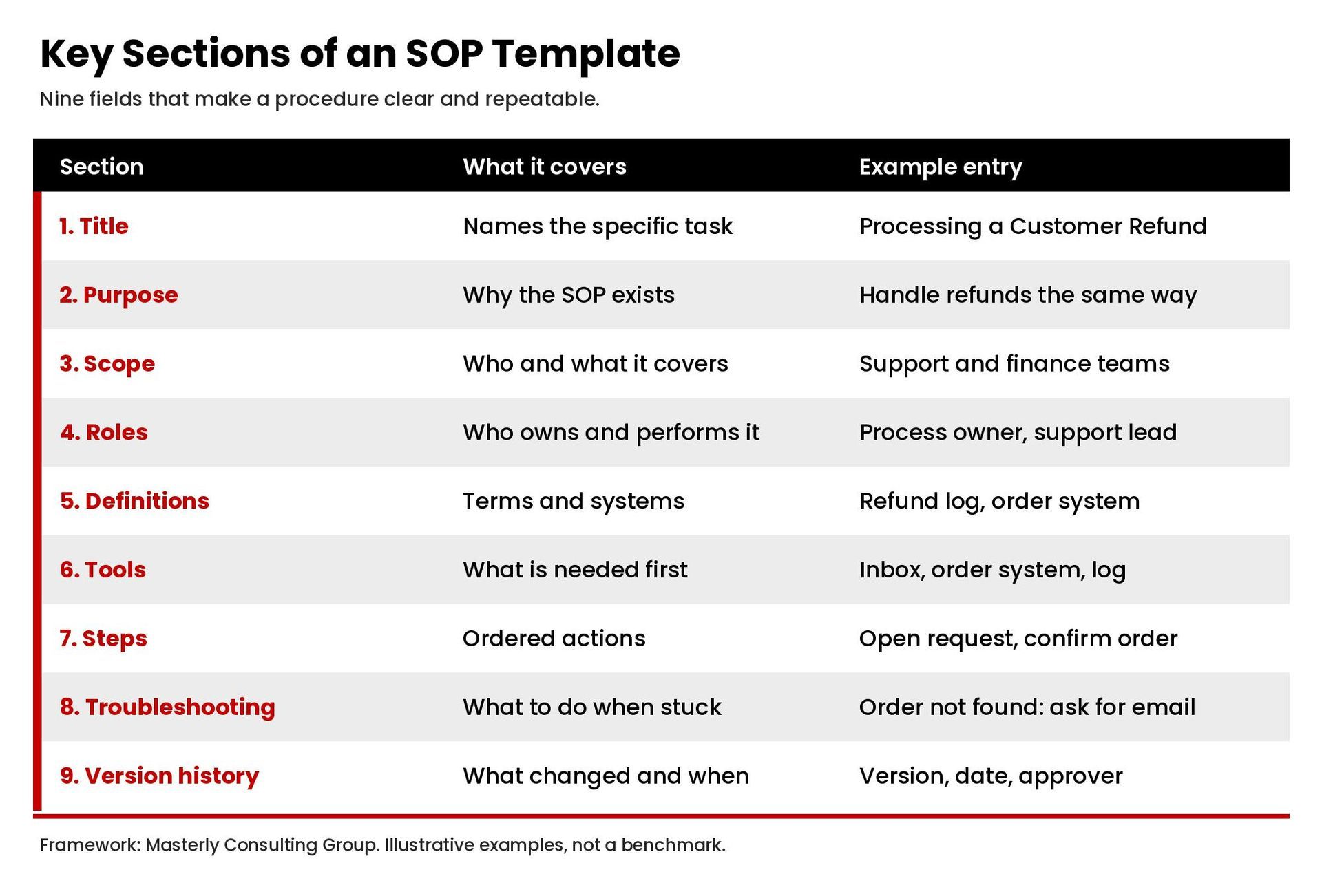
Most SOP documents share the same core sections. You can add or remove sections to fit your organization, but these are the key elements to start with.
- Descriptive title. Name the specific task, such as "Processing a Customer Refund," not a vague label like "Finance."
- Document control. Include the SOP number, version, effective date, author and approver. This is where version control begins.
- Purpose. One or two sentences explaining why the procedure exists and what outcome it supports.
- Scope. State who the procedure applies to, which teams or departments use it, and what it does not cover.
- Roles and responsibilities. List the process owner, the people who perform each step, and anyone who reviews or approves the work.
- Definitions. Give a clear definition for any term, acronym or system name a new reader might not know.
- Tools and materials. List the software, equipment, forms or access the person needs before starting.
- Procedure steps. Write the steps in order, each beginning with an active verb. Add decision points where the path changes.
- Troubleshooting steps. Describe what to do when something goes wrong or an input is missing.
- Records and references. Point to related forms, logs, checklists and other documents.
- Version history. Keep a short log of what changed, when and who approved it.
How to Write an SOP Step by Step
Knowing how to write an SOP is mostly a matter of order. Work through the process below and you will end up with a document people actually use.
1. Choose the process and set the boundaries
Start with one task. Decide where it begins and where it ends. A procedure that tries to cover an entire department becomes too long to follow, so split large workflows into smaller documents that link to each other.

2. Watch the work before you write about it
Ask the person who does the task every week to walk you through it, and take notes. Write down what they actually do, not what the old manual says. Note the tools they open, the files they check and the decisions they make along the way.
3. Pick a format that fits the task
SOP formats generally fall into three groups:
- Step by step list. Best for short, linear tasks with few decisions.
- Hierarchical steps. Best for longer tasks where each main step has sub steps.
- Flowchart. Best for tasks with many decision points, where the path depends on a result.
Many teams combine a short numbered list with a small flowchart for the decision points.
4. Draft the procedure steps
Use plain language and short sentences. Begin each step with an active verb, written as step by step instructions, such as "open," "enter," "confirm" or "send." Keep one action per step. Where a step needs a specific value, name it. If a number or deadline depends on company policy, mark it as to be confirmed rather than guessing.
5. Add risk and quality checks
Add a short risk assessment for tasks where mistakes cause harm, cost or compliance problems. For physical or safety related work, name the safety gear required and who the safety officers are. For financial or data work, add a check step where a second person reviews the result.
6. Test the SOP with someone new
Hand the draft to a person who has never done the task. Ask them to follow it without help. Every question they ask shows you a gap. Revise the document until a new reader can complete the task using only the page.
7. Approve, publish and train
Have the process owner approve the final version, assign it a number and store it in one shared location. Walk the team through it, and use it as part of training for new employees.
8. Review on a schedule
Set a review date, such as every six or twelve months, or sooner whenever the process, tool or regulation changes. A procedure that no longer matches the work is worse than none, because people stop trusting it. Continuous improvement depends on this step.
Free SOP Template You Can Copy
This SOP template is a plain, editable document. Copy the template below into Word, Google Docs or a spreadsheet and fill in each field. Delete any field that does not apply to your task.
SOP Title: [Descriptive title of the task]
SOP Number: [Department code and number]
Version: [1.0]
Effective Date: [Date]
Author: [Name and role]
Approved By: [Name and role]
Next Review Date: [Date]
1. Purpose [One or two sentences on why this procedure exists.]
2. Scope [Who this applies to, which teams, and what is excluded.]
3. Roles and Responsibilities [Process owner, performer, reviewer, approver.]
4. Definitions [Terms, acronyms and system names.]
5. Tools and Materials [Software, equipment, forms and access required.]
6. Procedure Steps Step 1: [Active verb and action.]Step 2: [Active verb and action.]Step 3: [Decision point. If X, go to step 4. If Y, go to step 6.]
7. Troubleshooting Steps [Common problems and what to do.]
8. Records and References [Related forms, logs and documents.]
9. Version History [Version, date, change made, approver.]
SOP Example: Processing a Customer Refund
The example below shows how the SOP template looks when it is filled in for a common task. The details are illustrative, so replace them with your own policies.
SOP Title: Processing a Customer Refund
Purpose: To handle refund requests the same way each time, so customers receive a clear answer and the finance team keeps accurate records.
Scope: Applies to the customer support team and the finance team. It does not cover chargebacks or disputes raised through a card issuer.
Roles and Responsibilities: The support agent receives and logs the request. The support lead approves refunds within the limit set by company policy. Finance issues the payment and records it.
Tools and Materials: Customer support inbox, order system, refund log spreadsheet, payment processor dashboard.
Procedure Steps:
- Open the customer's request and confirm the order number.
- Find the order in the order system and check the purchase date and amount.
- Compare the request to the refund policy. If the request meets the policy, go to step 4. If it does not, send the declined refund template and close the ticket.
- Enter the request in the refund log with the order number, amount and reason.
- Send the request to the support lead for approval.
- After approval, notify finance to issue the refund through the payment processor.
- Confirm the refund appears in the payment dashboard.
- Email the customer to confirm the refund and the expected time for it to appear, based on the payment processor's stated timing.
- Mark the ticket closed and update the log.
Troubleshooting Steps: If the order cannot be found, ask the customer for the confirmation email. If the payment processor shows an error, contact the finance lead before retrying.
Common SOP Mistakes to Avoid
- Writing at too high a level. If a step says "handle the request," a new reader still does not know what to do.
- Skipping the review step. Out of date instructions create the same confusion as having none.
- Burying the document. An SOP that nobody can find will not be used. Store every procedure in one place.
- Writing without the people who do the work. The best SOPs come from the person who performs the task weekly.
- Making it too long. If a document runs past a few pages, split it into linked procedures.
- Forgetting version control. Without a version number and history, teams follow outdated copies.
Tips for Keeping SOPs Useful
The key points are simple: keep each SOP document short, specific to one task, and easy to find. Employee training improves when the SOP document is the source people are trained from.
Keep sentences short and in the active voice. Use screenshots or photos where they save explanation. Number the steps so people can say "I am on step six." Assign every SOP to a named process owner who is responsible for keeping it current. Review the documents most used first, because those are the ones where errors would spread fastest.
Frequently Asked Questions About SOP Templates
What are the 5 parts of an SOP?
Different organizations use different formats, but five parts appear in nearly every SOP: a title and document control details, the purpose, the scope, the roles and responsibilities, and the procedure steps. Many teams add definitions, troubleshooting and version history.
Does Microsoft Word have an SOP template?
Microsoft publishes standard operating procedure templates that you can open in Word. You can also build your own using the template in this guide and save it as a reusable Word or Google Docs file.
Does Excel have an SOP template?
You can build an SOP in Excel, which works well for checklist style procedures and logs. For longer procedures with decision points, a word processor or flowchart tool is usually easier to read.
Can ChatGPT write an SOP?
An AI writing tool can produce a first draft from a description of the task. The person who performs the work still needs to check every step against what really happens, and the process owner should approve it before the team uses it.
What is the difference between an SOP and a policy?
A policy states what the organization requires and why. An SOP explains how to carry out a specific task to meet that requirement.
Conclusion: Turn Your Processes Into Documented Systems
A standard operating procedure template is a good starting point. Explore the format above, adapt the SOP template to your business, and write your first procedure this week. Documenting dozens of procedures across departments, aligning them with your goals and keeping them current takes more time than most leadership teams have.
Masterly Consulting Group helps organizations document and improve how their work gets done. Learn more about our standard operating procedures service, see how process improvement consulting removes bottlenecks without breaking what works, or contact Masterly Consulting Group to discuss your operations.