Business Process Mapping: Finding Where Work Slows Down Before Automating It
A business can have smart employees, strong demand, and good technology while work still moves too slowly.
Projects wait for approval.
Customers repeat information.
Employees copy the same data into several systems.
One department believes another team owns the next step.
Leaders see delays, but nobody can clearly explain where the delays begin.
That is where business process mapping becomes valuable: a structured review of how work moves from one step to another, including decisions, handoffs, ownership, delays, and the systems involved.
A process map gives business leaders, managers, and organizations a clearer picture of how work actually moves through the organization. It can reveal unnecessary steps, weak handoffs, repeated work, unclear ownership, approval problems, poor documentation, rework, and bottlenecks that may be limiting performance and affecting customer experience.
That matters before a company invests in new software, adds staff, or automates an existing workflow, because those decisions work better when leaders understand what should be fixed, staffed, documented, or standardized first.
Automation can make a strong process faster.
It can also make a weak process fail faster.
Masterly Consulting Group helps organizations examine how work moves across teams so leaders can make better decisions about process design, ownership, operations, staffing, customer experience, and automation readiness.
Business Process Mapping Makes Invisible Work Visible
Most employees understand their own responsibilities.
The problem is that few people see the complete workflow.
Sales understands sales.
Operations understands delivery.
Finance understands billing.
Customer service understands support.
But the customer or project moves across all of them.
A process map helps bring those separate activities into one view.
Instead of discussing the workflow from memory, leadership can see the sequence of actions, decisions, delays, and ownership points.
That creates a more useful conversation. Clear visualizations help teams stay on the same page and improve collaboration.
The question changes from:
"Why is this process always slow?"
to:
"Where exactly does the work stop, repeat, wait, or move backward?"
A Workflow Map Shows What Actually Happens
Written procedures often describe what should happen.
A workflow map should show what actually happens.
That difference matters.
Imagine a company that believes its new-client process has five simple steps:
Inquiry.
Qualification.
Proposal.
Agreement.
Onboarding.
In practice, the workflow may include much more across the entire process, including every activity and the people involved:
The inquiry goes to one employee.
That employee forwards it to another.
Someone requests missing information.
A manager approves pricing.
The customer waits for a response.
The agreement is sent.
Operations asks for information sales already collected.
Finance needs another approval.
Only then does onboarding begin.
Mapping also means arranging the steps involved in the correct order so leaders can see what actually happens.
The official process may look simple.
The real process may contain delays and repeated work.
Business process mapping makes those gaps easier to see.
Handoffs Are Often Where Work Breaks Down
Processes frequently become slower when responsibility moves from one person or department to another.
These handoffs are important because they create opportunities for information to be lost, delayed, or misunderstood.
A handoff may require:
A sales employee to notify operations.
A manager to approve a decision.
A team member to upload information.
A customer to provide another document.
A system to pass data to another platform.
Each transfer adds another point where the process can stall.
Clear Handoffs Need Clear Expectations
A useful process map should help leaders understand:
Who sends the work?
Who receives it, and which stakeholders involved need visibility at that handoff?
What information must be included?
What conditions must be met first?
How quickly should the next step occur?
What happens when something is missing?
Without those answers, employees create their own workarounds. Clear expectations also help teams manage process changes.
Those workarounds may keep the business moving for a while, but they become harder to manage as the company grows.
Bottlenecks Are Not Always Staffing Problems
When work piles up, leadership may assume the team needs more people.
Sometimes that is true.
But bottlenecks can come from many other sources.
A senior leader may approve too many routine decisions.
A department may receive incomplete information.
One employee may be the only person who understands a critical task.
Several teams may be waiting on the same system.
A process may include unnecessary review steps.
Employees may be redoing work because the requirements were unclear the first time.
Adding staff does not automatically solve these problems.
A process map helps leaders determine whether the issue is capacity, process design, ownership, or something else.
Process Ownership Should Be Visible
Many workflows involve several employees.
That does not mean ownership should be unclear.
Process ownership identifies who is responsible for the health of the overall process.
This is different from completing one step.
For example, several departments may participate in customer onboarding.
Sales gathers initial information.
Finance handles payment details.
Operations begins service delivery.
Customer support manages early questions.
Each department may perform its own tasks well.
But who owns the onboarding process as a whole?
Without clear ownership, nobody may feel responsible when the entire workflow becomes slow or inconsistent.
Business process mapping makes that question easier to address because leadership can see where responsibility begins, changes, and ends.
Process Documentation Should Follow Reality
Process documentation becomes more useful after the real workflow is understood.
Documenting an unclear process does not fix it.
It simply creates a written version of the confusion.
Mapping first allows leaders to identify what should stay, what should change, and what should be removed.
Then documentation can support the improved process. Clear maps also help with knowledge transfer and training for new employees through visual guides.
Useful process documentation may clarify:
Who owns each stage.
What triggers the process.
What information is required.
Which decisions are necessary.
When escalation is appropriate.
Where systems are used.
What successful completion looks like.
The goal is not to create long manuals.
It is to make recurring work easier to understand and repeat while also supporting compliance needs such as ISO 9000.
Business Process Mapping Can Reveal Rework
Rework is one of the most expensive forms of operational friction because people are completing work that was already attempted.
A customer may provide the same information twice.
An employee may rebuild a report because the first version used the wrong data.
A proposal may be rewritten because approval requirements were not clear.
Operations may redo work because sales did not capture the right details.
A process map can expose these loops.
When work moves backward instead of forward, leadership can ask why.
Is information missing?
Is quality inconsistent?
Is the process unclear?
Is someone reviewing work too late?
The answer may reveal a larger process-design problem.
Unnecessary Approvals Can Slow Growth
Approvals are useful when they control real risk or protect important decisions.
They become a problem when every routine action requires senior review.
As companies grow, approval structures that once made sense can become bottlenecks.
For example, a founder may have approved every proposal when the business had five employees.
Years later, the same approval step may still exist even though the company has managers who could reasonably own the decision.
A process map helps leadership see how much work is waiting for approval and whether those approvals still add value.
This is not about removing oversight.
It is about placing decision authority where it belongs.
Automation Readiness Begins With Process Clarity
Companies often want automation because the current process feels slow.
That instinct is understandable.
But automation readiness should be evaluated before software is configured.
A workflow should be reasonably clear before technology begins moving work automatically. A process mapping tool such as Microsoft Visio or Lucidchart can help teams visualize the workflow before automation.
Otherwise, the business may automate:
Duplicate steps.
Unnecessary approvals.
Incorrect routing.
Poorly defined responsibilities.
Incomplete information.
Outdated procedures.
Automation does not decide whether the process makes sense.
It simply follows the rules it is given.
Map First, Automate Second
Before automating a workflow, leadership should be able to answer:
What starts the process?
What information is required?
Who owns each stage?
What decisions require human judgment?
Which steps repeat, and what do existing processes show before you design a new process?
Where do exceptions occur?
What should trigger the next action?
If those questions are difficult to answer, the company may not be ready to automate the workflow yet.
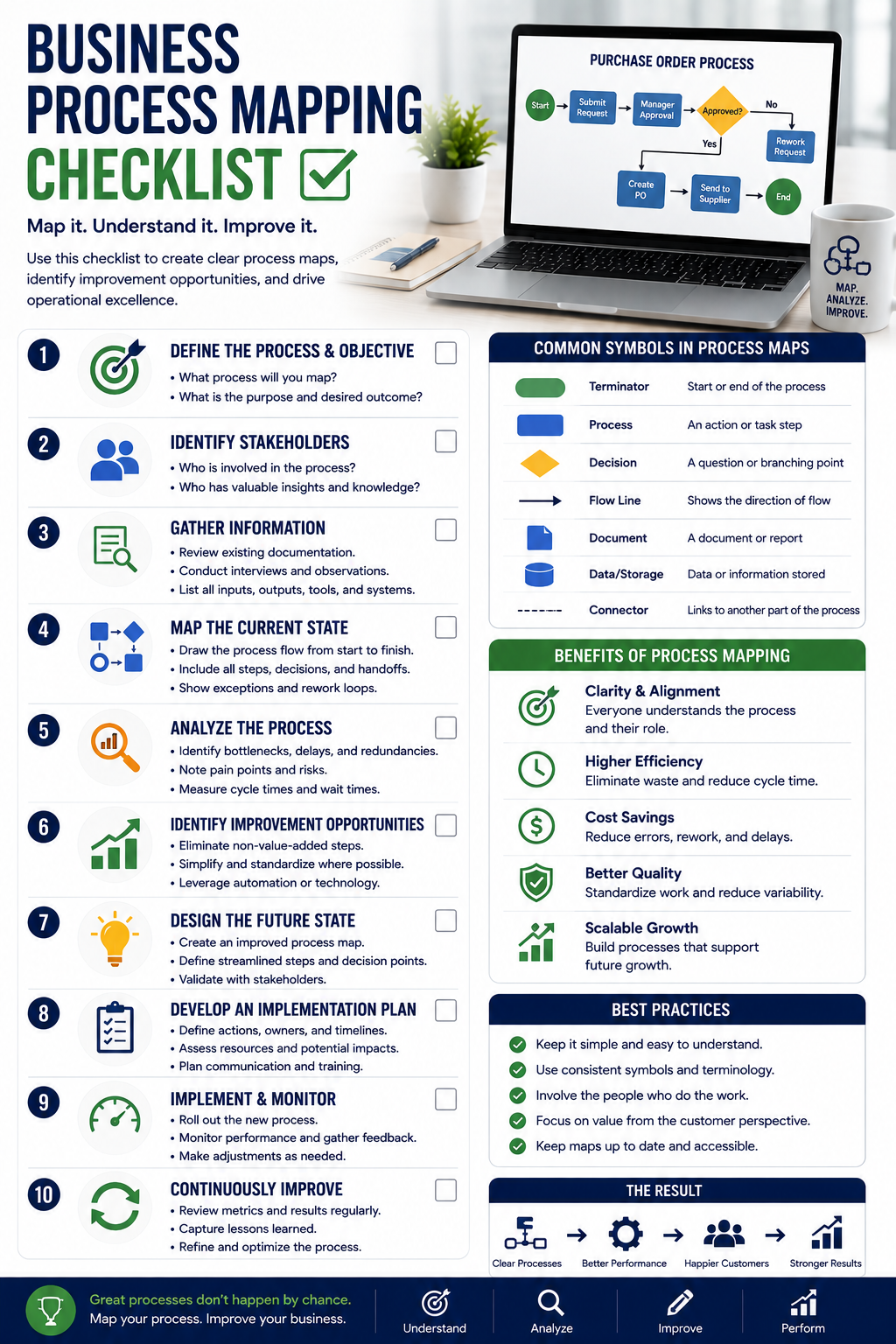
A Practical Business Process Mapping Framework
Leaders do not need to turn process mapping into an academic exercise.
A useful review can focus on six areas, but first create a process map with clear goals and input from the team. Review the draft with team members for accuracy and missing steps to build shared understanding.
1. Start and Finish
Identify where the process begins and what successful completion looks like by defining the start and end points before evaluating the map.
Basic symbols or flowchart symbols are commonly used to mark those boundaries, including end points, and to use standard symbols to represent tasks and decisions in maps.
A process without clear boundaries becomes difficult to evaluate.
2. Major Steps
List the actions that move the work forward.
Focus first on meaningful stages rather than every minor activity, because a basic flowchart is often the best process map type when the process steps are simple and sequential.
3. Handoffs
Identify where responsibility moves from one person, department, or system to another; one practical way to map processes across teams is with a cross functional map such as a swimlane diagram, alongside other common tools like flowcharts.
These transitions often reveal delays.
4. Decisions and Approvals
Mark where someone must make a decision before work continues; a detailed process map shows decision points more clearly before the next step moves ahead.
Ask whether each approval is necessary. Standard symbols can include a delay symbol when the map needs to show waiting time.
5. Bottlenecks and Rework
Identify places where work waits, repeats, returns, or requires correction.
These are often the strongest opportunities for process improvement and process optimization.
Mapping these issues helps improve processes and reduce waste before automation or staffing changes are made.
6. Ownership
Clarify who owns each major stage and who is responsible for the complete process.
This framework gives leadership a practical picture of the current workflow before redesigning it.
Process Mapping Can Support Better Staffing Decisions
When employees feel overwhelmed, leadership needs to understand why. In practice, process mapping enables better performance improvement decisions by showing whether the issue is staffing or workflow design.
A process map can help distinguish between:
Too much work.
Poorly distributed work.
Repeated work.
Work waiting for approvals.
Work caused by weak systems.
Work that belongs to another role.
This distinction supports better staffing decisions.
If demand truly exceeds capacity, hiring may be appropriate.
If employees are spending large amounts of time on simple tasks or fixing process problems, additional headcount may only add more people to the same inefficient workflow.
Business Process Mapping Can Drive Process Improvement and Improve the Customer Experience
Operational delays eventually become customer experiences.
A customer waits for an answer.
A client receives conflicting information.
A prospect repeats details.
A delivery date changes because an internal handoff failed.
The customer does not see the process map.
They experience the result.
That is why process clarity affects more than internal efficiency.
It can influence trust, consistency, responsiveness, and the reputation of the business.
A smoother process makes it easier for employees to provide a more consistent experience.
When Outside Process-Mapping Support Makes Sense
Some workflows are simple enough for internal teams to evaluate.
Outside support becomes more useful when the process crosses several departments, leadership cannot agree on the root problem, or employees have developed many informal workarounds.
Professional review can also help when:
- The same problem keeps returning
- Nobody owns the complete process
- Teams blame one another for delays
- Leadership is considering new software
- Automation is planned but the workflow is unclear
- Hiring is being discussed as the main solution
- Documentation does not match current practice
- Customer complaints point to internal handoff problems
An outside perspective can help the organization focus on how the process works rather than who is at fault.
Business Process Mapping Should Connect to Broader Operations
A process rarely exists alone.
Changes to one workflow can affect staffing, technology, customer service, reporting, and other departments.
That means process mapping should connect to broader operational decisions.
For example, changing a sales-to-operations handoff may affect the CRM and shape later choices around business process automation.
Changing approval authority may affect managers.
Changing client onboarding may affect finance and customer support, especially as part of digital transformation.
This is why a clear process map can become an important starting point for broader business process improvement.
Masterly Consulting Group Helps Leaders See How Work Really Moves
Masterly Consulting Group helps organizations examine how strategy, people, processes, and operating structures connect.
For business process mapping, the value is not simply creating a diagram, but applying process mapping techniques that fit the specific process.
The value comes from identifying what the diagram reveals.
Where does work wait?
Where does it repeat?
Where is ownership unclear?
Where are employees relying on personal knowledge instead of a consistent process?
Which steps may be candidates for automation?
Which issues need to be fixed before technology or staffing changes are made?
The right techniques help leaders get a better understanding of complex processes and complex workflows.
A structured review can give leadership a clearer basis for making those decisions.
The exact process-mapping, operations, and implementation scope should be confirmed for each engagement.
Frequently Asked Questions About Business Process Mapping
What is business process mapping?
Business process mapping is the structured review of how work moves from one step to another, including decisions, handoffs, ownership, delays, and systems. It is a core practice in business process management and may be documented through a standardized business process model such as BPMN, a standardized method for business process mapping.
What is a process map?
A process map is a visual representation of the stages, activities, and decisions within a business process, and there are different types of process maps depending on the workflow and the key elements you need to show. Common options include flowcharts and swimlane diagrams, while a SIPOC diagram categorizes suppliers, inputs, processes, outputs, and customers; for lean process improvement, a value stream map is a stream map used to visualize the value stream by tracking the flow of materials and information.
What is a workflow map?
A workflow map shows how tasks and information move between people, departments, or systems. In practice, workflow mapping lays out each specific task in sequence and often uses standard symbols to represent tasks and decisions.
Why are handoffs important in process mapping?
Handoffs are points where responsibility changes. They can create delays, missing information, and confusion when expectations are unclear.
How does process mapping identify bottlenecks?
A map can show where work frequently waits, requires approval, repeats, or depends on a limited person or resource.
What is process ownership?
Process ownership identifies who is responsible for the performance and consistency of the overall workflow.
What is process documentation?
Process documentation records how a process is expected to work, including responsibilities, steps, decisions, and requirements. Clear documentation of work processes also supports onboarding with visual guides for new employees and helps teams execute consistently.
How does business process mapping support automation readiness?
Automation readiness depends on having a clear and stable process. Mapping helps identify whether the workflow should be improved before automation begins and can also support software development, integrations, or automation planning once the workflow is clear.
Should a company map a process before changing software?
Often, yes. Understanding the current process first can help leadership determine what the new system actually needs to support. Leaders should also define clear start and finish boundaries before changing systems so the software supports the right process flow.
Discuss a Process-Mapping and Operations Review With Masterly Consulting Group
Before adding another employee, changing software, or automating a workflow, leadership should understand how the process works today.
Business process mapping can reveal hidden handoffs, bottlenecks, rework, unnecessary approvals, weak process ownership, and automation opportunities that may otherwise remain invisible. A high level process map can also help scope the current state before a more detailed process review, which may support project management and continuous improvement decisions.
Masterly Consulting Group can help leaders examine how work moves through the organization and identify where greater clarity may be needed before operational changes are made.
Call Masterly Consulting Group at (972) 236-5051 or visit masterlygroup.com to discuss a process-mapping and operations review with Masterly Consulting Group.